A CMDB that lives inside Microsoft 365
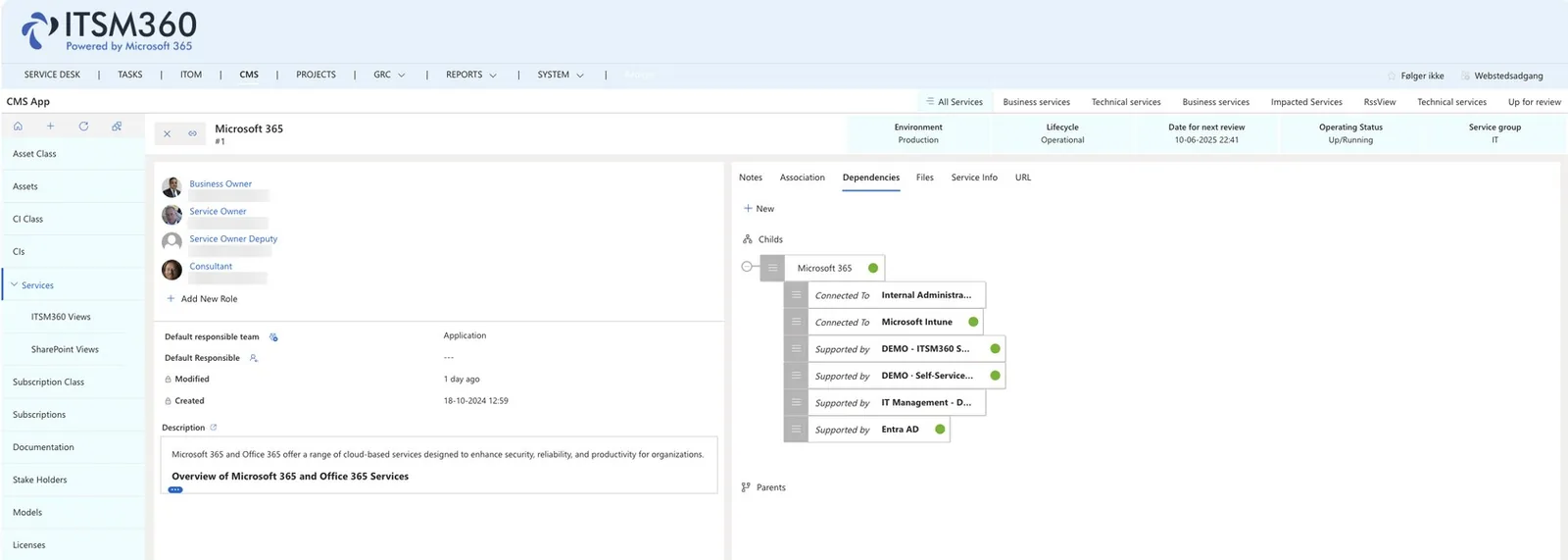
The CMS app is the record system behind the service desk. CIs, assets, services, suppliers, licences and their relationships sit in SharePoint in your own tenant, linked to tickets, changes and risks.
Key capabilities
One record system for IT master data in your own tenant. Every change, risk and incident can point to the CIs and services it concerns.
 CMDB and CI class management
Build CI classes with predefined attributes and inheritance. Attributes can be a JSON object, fields and columns, or record-based, so the model fits how your data actually looks.
 IT Asset Management
Track hardware and software assets through their lifecycle. Link assets to tickets, spot the most faulty device types, and handle handover and return with a signature.
 Service portfolio
Maintain the service portfolio. Each service shows its owners, its dependencies and the CIs that support it, so the impact of a change is visible in advance.
 Stakeholder and relationship management
Record the companies and people involved in your IT, their role and contact details, and their relationships to tickets, problems, changes and projects.
 Subscription and license management
See your Microsoft 365 subscriptions immediately, monitor overspend, and build workflows on subscription data. List licenses and publish them in Self-Service for users to order.
 Association and dependency model
Link tickets, changes and other records to the CIs they touch, and model the dependencies between CIs so a root cause is traceable.
 CI hygiene
Meter-based or time-based tasks and processes keep configuration data accurate long after the first import.
 Populated from Intune and Entra ID
A standard Intune flow brings devices into the CMS. Entra ID users and groups come in the same way, without a separate discovery tool.
A CMDB only pays off when ITSM processes are connected, these products tie into your CIs.


See Configuration Management in action
Book a demo and we will show you how CMDB and IT asset management work inside Microsoft 365.
Request a demo