GRC on the same data as your service desk
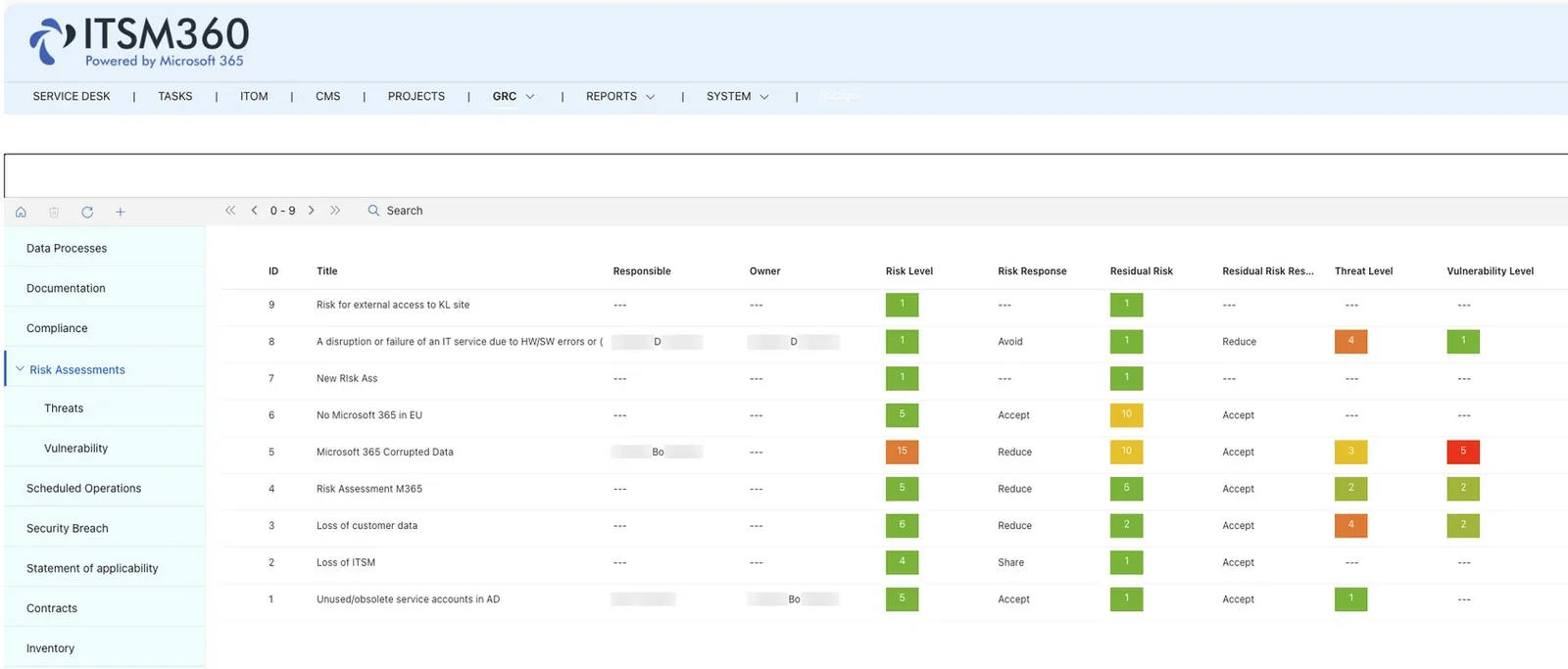
GRC360 manages frameworks, risks, controls, assessments and evidence on the ITSM360 data model. Risks link to CIs, services, changes and incidents, so an assessment shows the current operational situation.
Key capabilities
Bank Avera, a Swiss cooperative bank, links its controls and assessments to configuration items and changes in ITSM360. Its conclusion is that controls need operational context to be effective.
 Risk management
Maintain risk registers and assess risks against the CIs, services, changes and incidents they concern. Track treatment plans and progress.
 Control frameworks
Map your controls to ISO 27001 Annex A, NIS2, or custom frameworks. Track implementation status and link controls to evidence.
 Assessments in operational context
Risks and controls are linked to live service records, so an assessment reflects how your services run today.
 Evidence from service records
Audit evidence comes from the records the service desk works with. Auditors no longer start with an export from the ITSM system.
 An ISMS inside your tenant
Risk assessments, security documentation and recovery plans stay in your own tenant, under the same protection as the rest of your data.
- Policy and document control
Create, review, and approve policies with proper version control. Assign owners, set review cycles, and track acknowledgments.
 Incident and non-conformity tracking
Log security incidents and non-conformities. Link them to risks, controls, and corrective actions. Keep the full chain of evidence.
 Audit management
Plan and execute internal audits. Assign findings, track remediation and generate audit reports, all inside your Microsoft 365 environment.
GRC360 is a paid add-on that builds on top of your existing ITSM360 products. Licensed separately.


See GRC360 in action
Book a demo and we will show you how governance, risk, and compliance work inside Microsoft 365. GRC360 is licensed separately on top of your ITSM360 suite, we will walk you through the setup.
Request a demo