Built on Microsoft, entirely
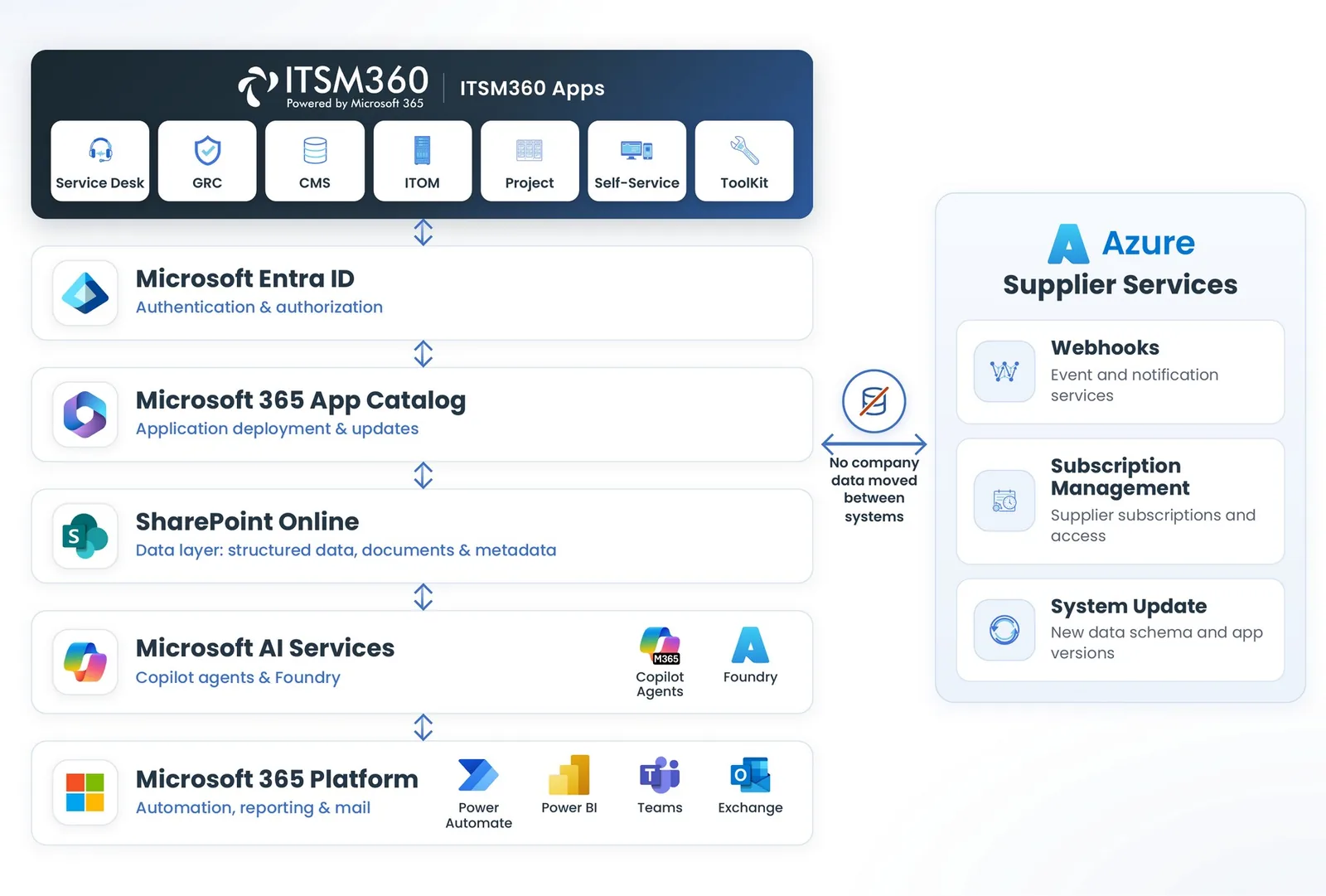
ITSM360 is a suite of SharePoint Framework applications that run inside your own tenant. SharePoint holds the data, Entra ID handles identity, and Power Automate, Power BI and Copilot do automation, reporting and AI.
One tenant, one architecture
ITSM360 sits inside the customer tenant. Data, identity and automation come from Microsoft services that are already running. Backend services handle timers and notifications without moving company data.
The stack, layer by layer
Every part of ITSM360 maps to a Microsoft service you already run. There is no hidden middleware and no proprietary database.
 SharePoint Framework apps
Purpose-built SPFx web parts and extensions, deployed as .sppkg files through your app catalogue. They run in Teams and SharePoint.
 SharePoint as SQL
One site with around 120 lists. Relationships are held as JSON and pointer lists, and a list holds up to 30 million records.
 Entra ID for identity
Entra ID governs sign-in, app access and API permissions. Admin rights are needed only during deployment.
 Backend services
SLA timers, notifications and approvals run as backend services. No company data is moved. With Backend in a Box the services run in your own Azure, as an option.
 Power Automate and Power BI
Runbooks and approvals run as Power Automate flows. Reporting uses Power BI templates on the SharePoint data.
 One security model
Conditional Access, Defender, Purview and the unified audit log apply to the service data as they do to the rest of your tenant.
Let your architects take a look
We're happy to walk through the architecture with your team. Book a technical demo and we'll cover SPFx packaging, permissions, data layout, and what happens during a customer tenant install.
Request a technical demo